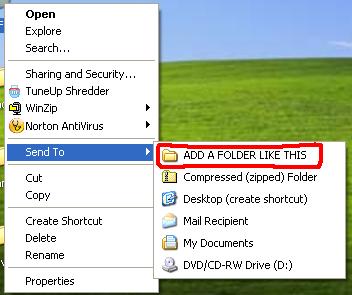
To add any folder or destination there follow this step-by-step guide.. :

Tuesday, August 9, 2011
The Magical God Mode Folder in Windows 7

What is GOD Mode Folder?
It’s a folder packed with shortcuts to just about every settings change and administrative function in Windows 7. Everything you’ll find in the Action Center, Backup and Restore, Autorun, Desktop Gadgets, Devices and Printers — it’s all there. All dumped in one central location for easy access. Learn how to do it:


Thursday, April 14, 2011
How to run TASM on Windows 7 64bit
Few days ago we have posted an article about installing Turbo C++ on 32 bit Windows 7. Now we are providing step-by-step procedure how to run TASM on 64 bit Windows 7.

1. Install the software DOSBox ver 0.73 : download here
2. Download and extract TASM into the C: drive (c:\): download here
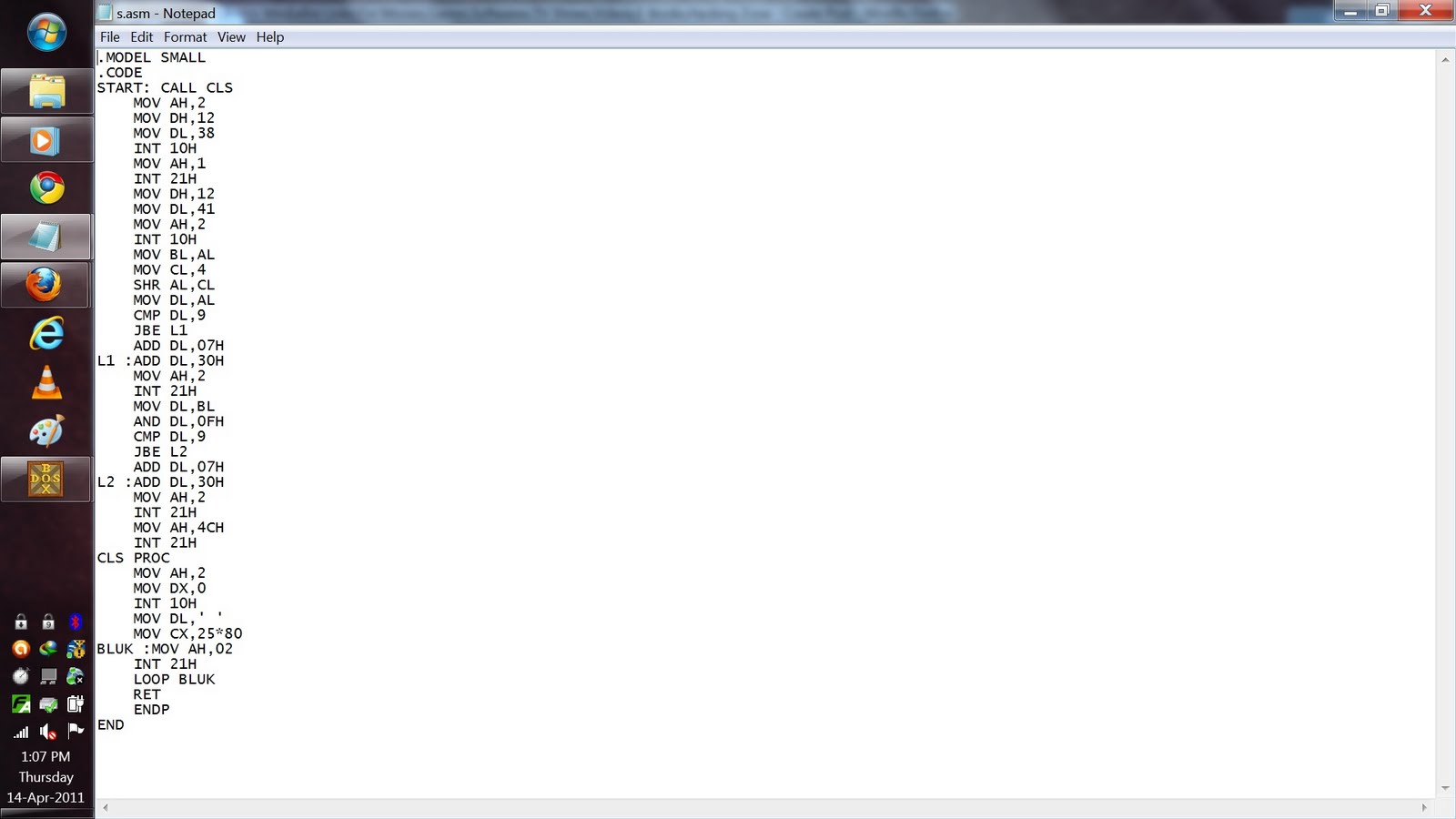
3. Now manually browse to "C:\TASM\" folder and create text file with any name.
and type full program inside that.
After that save the file as "FILE_NAME.ASM"
Here FILE_NAME can be anything but do not forget to put " before and after the file name.


4. Run the DOSBox 0.73 from the icon located on the desktop:
3. Now manually browse to "C:\TASM\" folder and create text file with any name.
and type full program inside that.
After that save the file as "FILE_NAME.ASM"
Here FILE_NAME can be anything but do not forget to put " before and after the file name.

4. Run the DOSBox 0.73 from the icon located on the desktop:

Wednesday, December 29, 2010
Enable checkboxes for selecting files in Windows Vista/7 Explorer

You’re probably used to hit either CTRL or SHIFT to select multiple files (one by one or a consecutive bunch, respectively). However, if you accidentally misclick, your selection is lost and you have to start over.
This is would not happen if you’d be able to select files in a checkbox manner, would it?
This is would not happen if you’d be able to select files in a checkbox manner, would it?
MICROSOFT TRICKS
MAGIC #1
An Indian discovered that nobody can create a FOLDER anywhere on the computer which can be named as “CON”. This is something pretty cool…and unbelievable… At Microsoft the whole Team, couldn’t answer why this happened!
TRY IT NOW ,IT WILL NOT CREATE ” CON ” FOLDER
TRY IT NOW ,IT WILL NOT CREATE ” CON ” FOLDER
[ The name “CON” in windows is reserved for console devices (Keyboard if used as input and Monitor if used as output) hence it can not be used to create any file or directory of this name.]
Make an Undeleteable Folder in windows

It often happens that some of your folders contain very important data and you delete those folders by mistake. So why not make such folders UNDELETEABLE & avoid such mistakes..! [Works with Windows XP|Vista|Seven]
Assign a Permanent Drive Letter to USB Drive
If you have multiple pen drives you might have noticed that every time you put in your drive it will be assigned a different drive letter. This can be very annoying, when you trying to open files of pendrive from some software as recent drive letter is changed you have to change address again. So now here is one solution for this problem assign permanent letter to your USB pendrive. Its very simple just follow given steps:
Friday, December 17, 2010
10 Tips to Avoid Getting Adware

Adware, malware, spyware and viruses can bring your system to its knees. They are detrimental, lowering the performance of your computer. You might need to replace data. You might lose unique files. Keep the nasties away from your computer using these ten simple tips.
Friday, November 5, 2010
How Windows Product Activation (WPA) Works?

Windows Product Activation or WPA is a license validation procedure introduced by Microsoft Corporation in all versions of it’s Windows operating system. WPA was first introduced in Windows XP and continues to exist in Windows Server 2003, Windows Vista, Windows Server 2008 and Windows 7 as well. WPA enforces each end user to activate their copy of Windows so as to prevent unauthorized usage beyond the specific period of time until it is verified as genuine by Microsoft. How WPA really works was a closely guarded secret until GmbH analyzed WPA using a copy of Windows XP RC1 and published a paper on their findings.
In this post you will find answers to some of the most frequently asked questions about Windows Product Activation.Why activation?
Microsoft’s intention behind the activation is to limit the usage of it’s Windows operating system to only one machine for which the retail license is issued. Any other computer which runs on the same license must be disallowed from using the software. Thus WPA demands for activation of the product within 30 days of it’s installation so as to ensure that it is genuine.
Friday, October 22, 2010
Auto Shutdown PC With Timer

Auto Shutdown PC With Timer ********** METHOD # 1 **********
Step 1:Right click on your desktop and choose “New=>shortcuts”.
Step 2:
Make ur keyboard a live disco…!

Guys this is one of the coolest trick that iam going to share with you.
This code when executed makes your Caps, Num, Scroll lock keys led on the Keyboard flash. Whats more it works on both laptops and desktops and is totally harmless and
very attractive…i have tried it..trust me..
Instructions:
*paste the code in notepad
*Save as disco.vbs
*Run the file
Make an Undeleteable Folder in windows

It often happens that some of your folders contain very important data and you delete those folders by mistake. So why not make such folders UNDELETEABLE & avoid such mistakes..! [Works with Windows XP|Vista|Seven]
1]- Open CMD ( Type in Run option, the command ‘cmd’ or navigate to All Programs->Accessories-> Command Prompt)
Wednesday, October 6, 2010
How To Bypass Windows 7 Logon Password In Three Steps
Have you forgot your XP, Vista or Windows 7 logon password? Sure, there are a few workarounds to access your account using a bootable Linux CD but they are time consuming and boring as you need to go through a long procedure.

Saturday, September 11, 2010
HOW TO WRITE YOUR NAME ON TASKBAR

Here a a simple trick by using which you can have your name at the right side of taskbar.
It is a interesting and simple trick ,you just have to perform some steps with your windows.
This trick works with almost all windows XP/VISTA/&.
So here we start it...

