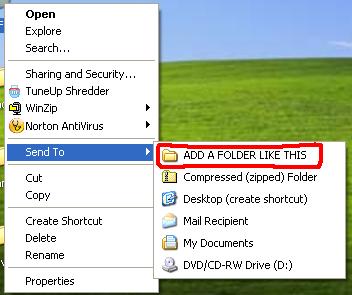
To add any folder or destination there follow this step-by-step guide.. :

Tuesday, August 9, 2011
The Magical God Mode Folder in Windows 7

What is GOD Mode Folder?
It’s a folder packed with shortcuts to just about every settings change and administrative function in Windows 7. Everything you’ll find in the Action Center, Backup and Restore, Autorun, Desktop Gadgets, Devices and Printers — it’s all there. All dumped in one central location for easy access. Learn how to do it:


How to install Turbo C++ on Windows 7 64bit
Few days ago we have posted an article about installing Turbo C++ on 32 bit Windows 7. Now we are providing step-by-step procedure how to install Turbo C++ on 64 bit Windows 7.
1. Install the software DOSBox ver 0.73 : download here
2. Create a folder,for example „Turbo“ (c:\Turbo\)
3. Download and extract TC into the Turbo folder (c:\Turbo\): download here
4. Run the DOSBox 0.73 from the icon located on the desktop:

How Antivirus Software Works

Due to ever increasing threat from virus and other malicious programs, almost every computer today comes with a pre-installed antivirus software on it. In fact, an antivirus has become one of the most essential software package for every computer. Even though every one of us have an antivirus software installed on our computers, only a few really bother to understand how it actually works! Well if you are one among those few who would really bother to understand how an antivirus works, then this article is for you.
How Antivirus Works
An antivirus software typically uses a variety of strategies in detecting and removing viruses, worms and other malware programs. The following are the two most widely employed identification methods:
1. Signature-based dectection (Dictionary approach)
This is the most commonly employed method which involves searching for known patterns of virus within a given file. Every antivirus software will have a dictionary of sample malware codes called signatures in it’s database. Whenever a file is examined, the antivirus refers to the dictionary of sample codes present within it’s database and compares the same with the current file. If the piece of code within the file matches with the
Thursday, April 14, 2011
How to run TASM on Windows 7 64bit
Few days ago we have posted an article about installing Turbo C++ on 32 bit Windows 7. Now we are providing step-by-step procedure how to run TASM on 64 bit Windows 7.

1. Install the software DOSBox ver 0.73 : download here
2. Download and extract TASM into the C: drive (c:\): download here
3. Now manually browse to "C:\TASM\" folder and create text file with any name.
and type full program inside that.
After that save the file as "FILE_NAME.ASM"
Here FILE_NAME can be anything but do not forget to put " before and after the file name.


4. Run the DOSBox 0.73 from the icon located on the desktop:
3. Now manually browse to "C:\TASM\" folder and create text file with any name.
and type full program inside that.
After that save the file as "FILE_NAME.ASM"
Here FILE_NAME can be anything but do not forget to put " before and after the file name.
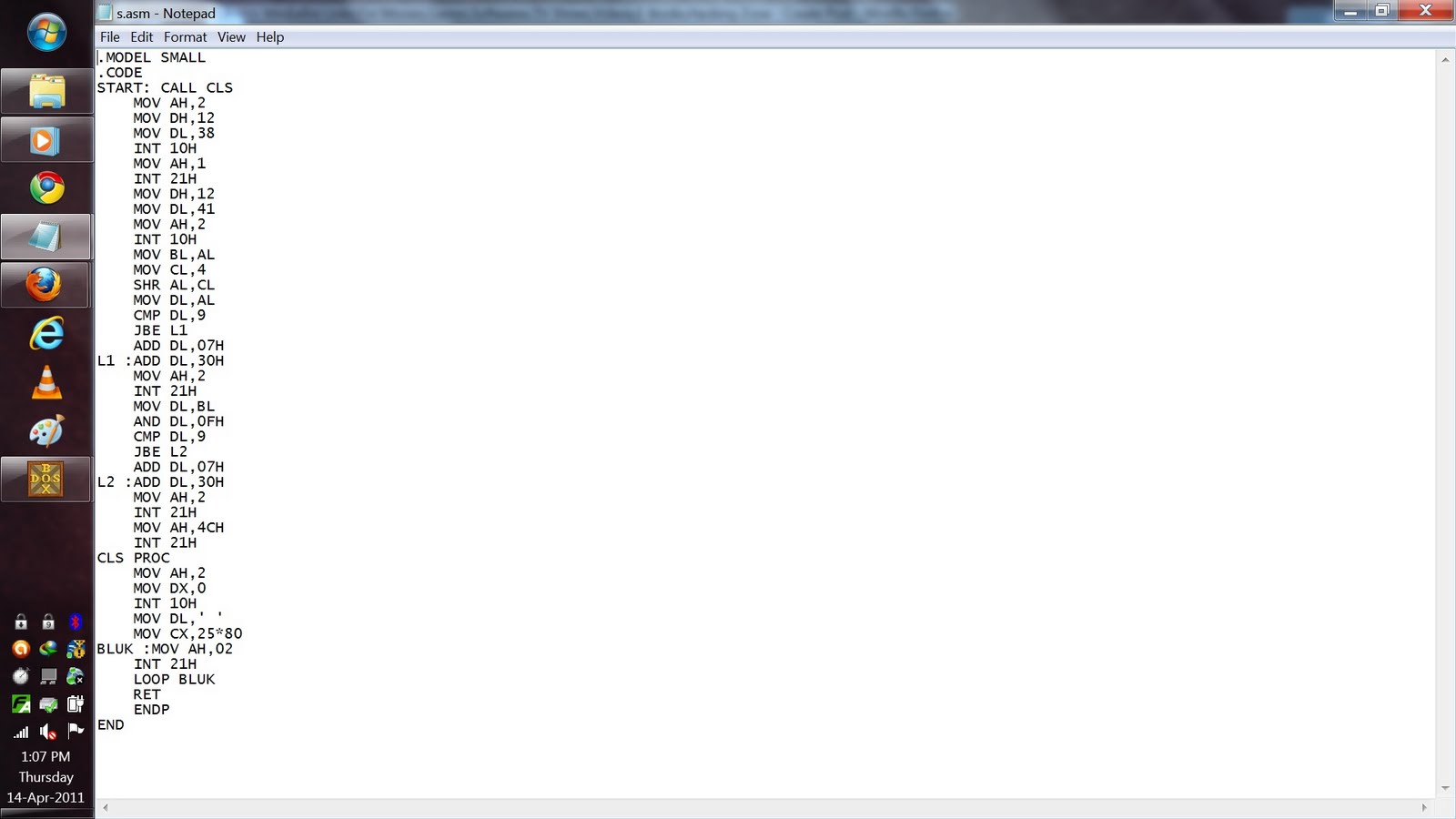

4. Run the DOSBox 0.73 from the icon located on the desktop:
Friday, February 25, 2011
How to Write-Protect USB Flash Drive

Many a time, it becomes necessary for us to write protect our USB flash drive so as to protect it from viruses and other malware programs. Because flash drives are so popular and most widely used to move data between computers, they are the prime target for attackers as a means to get infections spread around the computer world. Also, since USB drive is not a Read-Only Memory (ROM), the data inside it can easily be modified or deleted by malware programs.
But unfortunately, most of the new flash drives do not come with a write-protect feature as the manufacturers wish to cut down the cost of production. Hence, the only way to write-protect your USB flash drives is to enable this feature on your own computer.
This can be done by adding a small entry to the Windows registry which acts as a switch that can be enabled to make use of the write protection or disabled to allow write access. Just follow these steps:
1. Open the Registry Editor (Open the “Run” dialog box, type regedit and hit “Enter”).
2. Navigate to the following Registry key:
HKEY_LOCAL_MACHINE\SYSTEM\CurrentControlSet\Control\
Friday, December 31, 2010
How to Trace Any Number in The WORLD [International Tracing]

With the rapid growth of mobile phone usage in recent years, we have often observed that the mobile phone has become a part of many illegal and criminal activities. So in most cases, tracing the mobile number becomes a vital part of the investigation process. Also sometimes we just want to trace a mobile number for reasons like annoying prank calls, blackmails, unknown number in a missed call list or similar.
Even though it is not possible to trace the number back to the caller, it is possible to trace it to the location of the caller and also find the network operator. Just have a look at this page on tracing Indian mobile numbers from Wikipedia. Using the information provided on this page, it is possible to certainly trace any mobile number from India and find out the location (state/city) and network operator (mobile operator) of the caller. All you need for this is only the first 4-digit of the mobile number. In this Wiki page you will find all the mobile number series listed in a nice tabular column where they are categorized based on mobile operator and the zone (state/city). This Wiki page is updated regularly so as to provide up-to-date information on newly added mobile number series and operators. I have used this page many a time and have never been disappointed.
What are Private and Public IP Addresses

Internet Protocol (IP) addresses are usually of two types: Public and Private. If you have ever wondered to know what is the difference between a public and a private IP address, then you are at the right place. In this post I will try to explain the difference between a public and a private IP addres in layman’s terms so that it becomes simple and easy to understand.
How to Detect Anonymous IP Addresses

As the fraudsters are now becoming more sophisticated in bypassing the Geo-location controls by using proxies (Anonymous IPs) to spoof their IP address, it has become very much necessary to come up with a means for detecting the proxies so that the authenticity of the users can be verified. Using a proxy (web proxy) is the simplest and easiest way to conceal the IP address of an Internet user and maintain the online privacy. However proxies are more widely used by online fraudsters to engage in cyber crimes since it is the easiest way to hide their actual Geo-location such as city/country through a spoofed IP address. Following are some of the examples where fraudsters use the proxies to hide their actual IP.
Wednesday, December 29, 2010
Enable checkboxes for selecting files in Windows Vista/7 Explorer

You’re probably used to hit either CTRL or SHIFT to select multiple files (one by one or a consecutive bunch, respectively). However, if you accidentally misclick, your selection is lost and you have to start over.
This is would not happen if you’d be able to select files in a checkbox manner, would it?
This is would not happen if you’d be able to select files in a checkbox manner, would it?
MICROSOFT TRICKS
MAGIC #1
An Indian discovered that nobody can create a FOLDER anywhere on the computer which can be named as “CON”. This is something pretty cool…and unbelievable… At Microsoft the whole Team, couldn’t answer why this happened!
TRY IT NOW ,IT WILL NOT CREATE ” CON ” FOLDER
TRY IT NOW ,IT WILL NOT CREATE ” CON ” FOLDER
[ The name “CON” in windows is reserved for console devices (Keyboard if used as input and Monitor if used as output) hence it can not be used to create any file or directory of this name.]
Make an Undeleteable Folder in windows

It often happens that some of your folders contain very important data and you delete those folders by mistake. So why not make such folders UNDELETEABLE & avoid such mistakes..! [Works with Windows XP|Vista|Seven]
Assign a Permanent Drive Letter to USB Drive
If you have multiple pen drives you might have noticed that every time you put in your drive it will be assigned a different drive letter. This can be very annoying, when you trying to open files of pendrive from some software as recent drive letter is changed you have to change address again. So now here is one solution for this problem assign permanent letter to your USB pendrive. Its very simple just follow given steps:
How to Enable Right Click on Sites that Disable it!!!
There are lots of web sites that have disabled the right click function
of the mouse button… which it’s really, really annoying!!
This is done so that you don’t steal (via right-click->save picture) their photos
or images or any other goodies.
But It’s easy to change, assuming your using IE 6 or higher:
of the mouse button… which it’s really, really annoying!!
This is done so that you don’t steal (via right-click->save picture) their photos
or images or any other goodies.
But It’s easy to change, assuming your using IE 6 or higher:
Friday, December 17, 2010
How Firewalls Work

10 Tips to Avoid Getting Adware

Adware, malware, spyware and viruses can bring your system to its knees. They are detrimental, lowering the performance of your computer. You might need to replace data. You might lose unique files. Keep the nasties away from your computer using these ten simple tips.
Friday, November 5, 2010
Know More About Secure Sockets Layer (SSL)

Secure Sockets Layer (SSL) is the most widely used technology for providing a secure communication between the web client and the web server. Most of us are familiar with many sites such as Gmail, Yahoo etc. using https protocol in their login pages. When we see this, we may wonder what’s the difference between http and https. In simple words HTTP protocol is used for standard communication between the Web server and the client. HTTPS is used for a SECURE communication.
How Windows Product Activation (WPA) Works?

Windows Product Activation or WPA is a license validation procedure introduced by Microsoft Corporation in all versions of it’s Windows operating system. WPA was first introduced in Windows XP and continues to exist in Windows Server 2003, Windows Vista, Windows Server 2008 and Windows 7 as well. WPA enforces each end user to activate their copy of Windows so as to prevent unauthorized usage beyond the specific period of time until it is verified as genuine by Microsoft. How WPA really works was a closely guarded secret until GmbH analyzed WPA using a copy of Windows XP RC1 and published a paper on their findings.
In this post you will find answers to some of the most frequently asked questions about Windows Product Activation.Why activation?
Microsoft’s intention behind the activation is to limit the usage of it’s Windows operating system to only one machine for which the retail license is issued. Any other computer which runs on the same license must be disallowed from using the software. Thus WPA demands for activation of the product within 30 days of it’s installation so as to ensure that it is genuine.
What to Do When Your Email Account is Hacked?
How to Recover Hacked Email Accounts?

For Gmail:
It can be a big disaster if your Gmail account has been compromised as it may be associated with several services like Blogger, Analytics, Adwords, Adsense, Orkut etc. Losing access to your Gmail account means losing access to all the services associated it with too. Here is a list of possible recovery actions that you can try.
Sunday, October 24, 2010
Order Free Ubuntu/Kubuntu CD


1. Go to www.shipit.ubuntu.com
2. Select---Desktop Edition
3. Select---Create a new account
4. Fill your login details
5. Verify your account from the email you recieve
6. Now fill your shipping address and other details
7. Click on submit
8. Wait for 14-15 days and you will have Ubuntu CD shipped from UK in your hands absolutely free (no strings attatched coz its open source)
Go to www.shipit.kubuntu.org and follow the same steps to order a Kubuntu CD.
Enjoy open sourcing!!!

